The question 01
AI-assisted development can produce code quickly, but reviewing the result still involves several separate questions: what was changed, which checks actually ran, what failed, and whether the work should enter the original project.
AgentBoard explores how those questions can become part of one visible workflow. It combines discussion, scoped tasks, test output, review findings and code differences in a local workspace, with Python supervising execution and recorded state.
The workspace 02
The delivery view starts with a goal and keeps work grouped by status. A separate agent conversation space supports free discussion before choosing a project; project references, saved consensus and task drafts connect planning to later work.
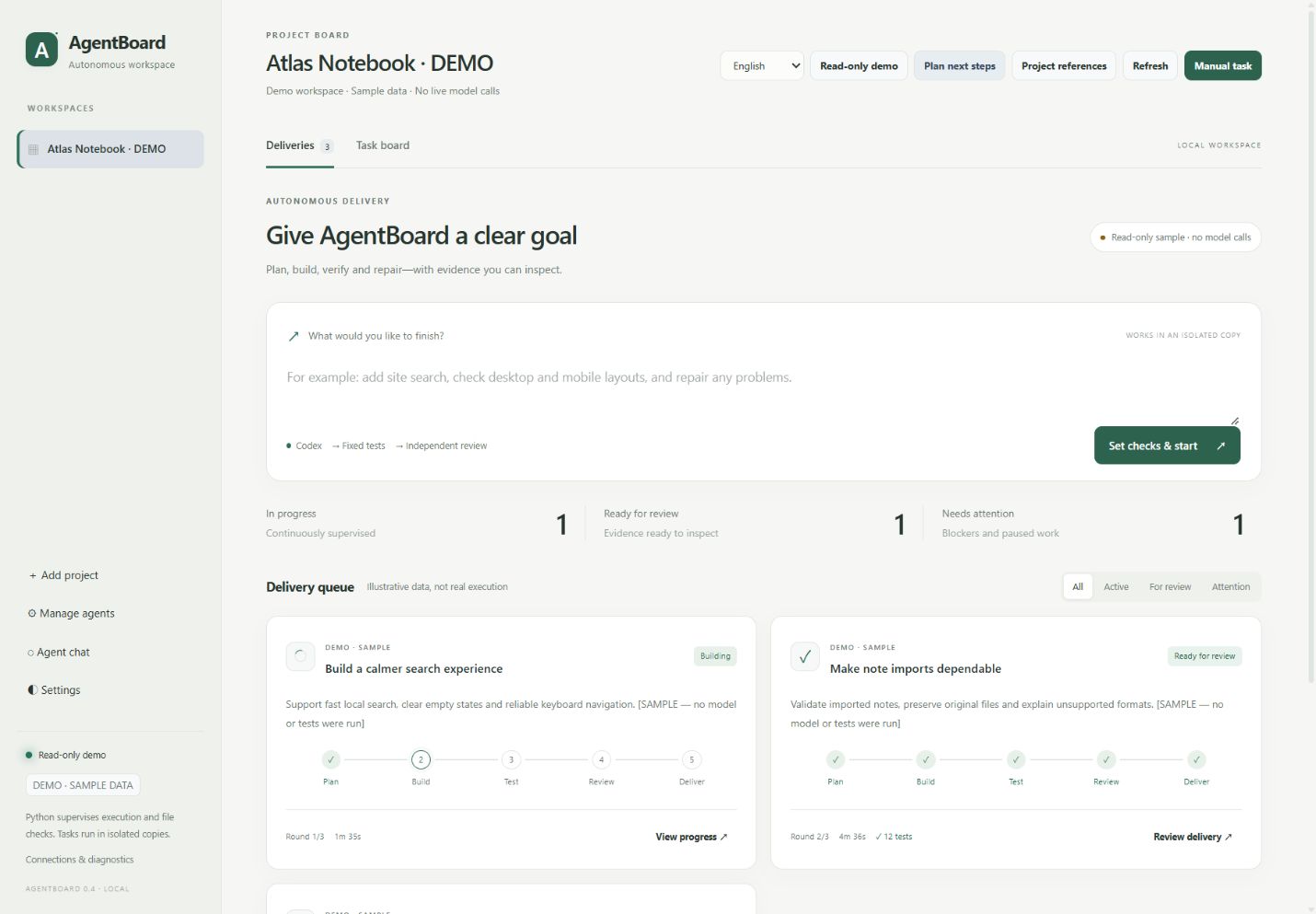
The interface supports Chinese and English, three appearance themes, pause/resume controls and recoverable project/task removal. The core distinction is between work in progress, evidence ready for review, and work that needs attention.
From goal to review 03
The autonomous delivery loop uses Codex. Expand each stage to see what the local supervisor does and where the user retains control.
01Define the goal and checks
Select a project, allowed files, a verification recipe, time limit and repair budget. Existing acceptance files are hashed before work starts so implementation cannot silently rewrite its own baseline.
02Plan and build in a copy
Codex works in a separate project copy. Python records the current phase and checks file scope and protected paths. A work copy helps preserve the original; it is not an operating-system security sandbox.
03Run checks and review separately
Python executes the configured checks. Zero discovered tests and syntax-only acceptance cannot establish delivery. A fresh Codex session then reviews a read-only snapshot and the check evidence.
04Return concrete failures for repair
Failed checks or serious review findings return to implementation. Round, time, quota and no-progress limits bound the loop. SQLite checkpoints support recovery when the local service runs again.
05Inspect, then accept
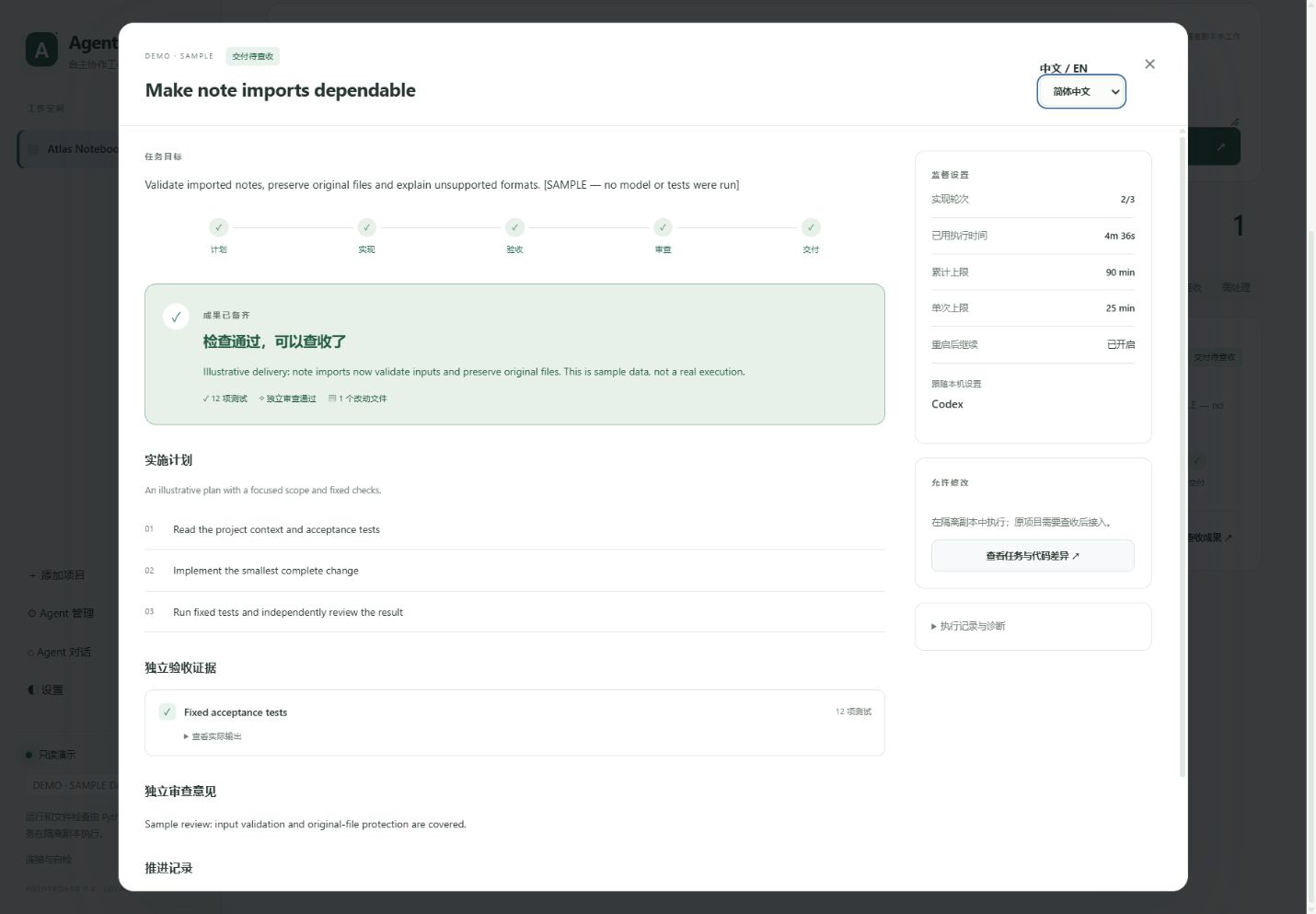
The delivery report brings together checks, review findings and changes. Integration into the original project requires an explicit user action and another source-drift check. Rollback checks for conflicting newer edits.
DeepSeek Harness and custom adapters support their documented task or discussion roles. They do not automatically share the Codex autonomous review loop.
Design choices 04
Keep acceptance separate from implementation
Fixed checks provide a reference outside the builder’s completion message. Their output and actual test counts remain inspectable, while independent model review adds another judgement. Neither establishes correctness on its own.
Make stopping part of the workflow
A task can pause or need attention when time, quota, scope or progress conditions prevent continuation. This makes incomplete work visible and gives the user a decision point, rather than treating every run as a delivery.
Separate delivery from integration
A finished work copy is available for inspection before it affects the original project. This adds a review step but preserves the user’s opportunity to reject or revise the result.
Evidence & limits 05
The local README and changelog report 178 offline tests passing on Windows, with additional desktop/mobile checks using a local simulator. Those records describe the AgentBoard source update; the screenshots on this page demonstrate its interface only. The application test suite was not rerun for this portfolio case study.
- Offline tests use simulated model responses. They can check lifecycle and integrity rules without establishing how a live model will perform on every task.
- Live execution has external dependencies. It requires an installed, authenticated executor and available account quota.
- The application is local and primarily verified on Windows. It has no public-hosting authentication or multi-user permission system.
- Checks have a defined scope. Screenshots and visible-text checks do not replace interaction testing, accessibility review or human visual judgement.
The project remains an early release. No external user-study results, productivity gains or unattended correctness guarantees are claimed here.
Further work 06
A useful next study would ask a small group of users to review the same task with and without the delivery report, observing which evidence they consult and where they hesitate to accept a result. That study has not yet been conducted.
Further development could extend browser interaction checks and improve setup and update guidance. For my portfolio, AgentBoard adds a question about how work is organised: how can a tool make progress, uncertainty and responsibility easier to see?
Source & documentation
The public repository includes setup guidance and source documentation. AgentBoard is a local application; this portfolio presents the project rather than a hosted instance.
Explore AgentBoard on GitHub